
Guitar Tabs - Jellynote1.3.5 - App Store
You'll be able to see results in few seconds.
Publisher Description
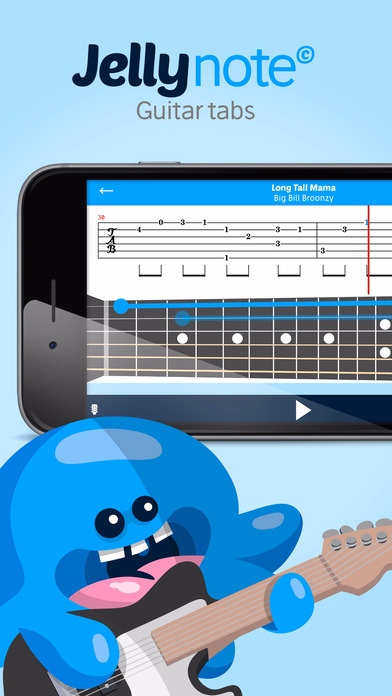
Guitar Tabs by Jellynote is the ultimate way to learn and practice your favorite songs on guitar.
You can learn guitar from scratch and become the next Jimmy Page, Slash or Eric Clapton!
We are making Guitar playing fun & inspiring thanks to more than 500k free, high quality and interactive guitar tabs and chords.
User-Friendly features:
Huge catalogue from The Beatles to Metallica! Free daily updates
Easy Search
Filter by genre: Rock / Metal / Pop / Folk / Electronic / Soul / Hip-Hop / Reggae / Jazz / Soundtrack / Classical
Filter by level: Beginner / Intermediate / Advanced
Filter by Artists
Synchronize your favorite songs with your jellynote.com account!
History, easily find what you have already played
Share with your friends your tabs
Tempo control: play the song at your own speed.
Display features: only staff, only tab or both
Audio player: listen to the song with a good playback sound. Real time highlight of the notes that you should be playing.
Multiple tracks control: set up the volume of each track
Cover videos from YouTube
Instruments views: how to read traditional sheet music and how to read guitar tablature
Guitar tabs features:
You have for each song the different chord charts with fingers positions
Learning and practice mode : Like being in a real lesson we will give you feedback on how you are playing and help you to become a guitar hero!
Auto-scroll to scroll automatically the chords & lyrics the speed you want
Guitar Tab: this view represents the strings with the flow of the fingers positions so that you can check out and anticipate your fretting hand positions. It's a real time tablature.
Fretboard: This view is more realistic, it shows in real time where the fingers should be on the fretboard.
Subscribe to Jellynote Premium - One account for all platforms
Monthly plan: $9.99 renewed automatically each month
Yearly plan: $59.99 renewed automatically each year - Save 50%!
Your Jellynote subscription will automatically renew each month and your credit card will be charged through your iTunes account. You can turn off auto-renew at any time from your iTunes account settings.
Auto-renewal feature: your subscription automatically renews unless auto-renew is turned off at least 24-hours before the end of the current period. Your iTunes account will automatically be charged at the same price for renewal within 24-hours prior to the end of the current monthly period unless you change your subscription preferences in your account settings. You can manage your subscriptions through your Account Settings after purchase. No cancellation of the current subscription is allowed during active subscription period. Please go to https://www.jellynote.com/en/term-of-service for more information.
Requires iOS 8.0 or later. Compatible with iPhone, iPad, and iPod touch.
About Guitar Tabs - Jellynote
The company that develops Guitar Tabs - Jellynote is ORPHEE MUSIC. The latest version released by its developer is 1.3.5.
To install Guitar Tabs - Jellynote on your iOS device, just click the green Continue To App button above to start the installation process. The app is listed on our website since 2016-02-11 and was downloaded 0 times. We have already checked if the download link is safe, however for your own protection we recommend that you scan the downloaded app with your antivirus. Your antivirus may detect the Guitar Tabs - Jellynote as malware if the download link is broken.
How to install Guitar Tabs - Jellynote on your iOS device:
- Click on the Continue To App button on our website. This will redirect you to the App Store.
- Once the Guitar Tabs - Jellynote is shown in the iTunes listing of your iOS device, you can start its download and installation. Tap on the GET button to the right of the app to start downloading it.
- If you are not logged-in the iOS appstore app, you'll be prompted for your your Apple ID and/or password.
- After Guitar Tabs - Jellynote is downloaded, you'll see an INSTALL button to the right. Tap on it to start the actual installation of the iOS app.
- Once installation is finished you can tap on the OPEN button to start it. Its icon will also be added to your device home screen.
Program Details
System requirements
Download information
Pricing
Version History
version 1.3.5
posted on 2016-02-11
Disclaimer
Official App Store Link
We do not host Guitar Tabs - Jellynote on our servers. We did not scan it for viruses, adware, spyware or other type of malware. This app is hosted by Apple and passed their terms and conditions to be listed there. We recommend caution when installing it.
The App Store link for Guitar Tabs - Jellynote is provided to you by apps112.com without any warranties, representations or guarantees of any kind, so access it at your own risk.
If you have questions regarding this particular app contact the publisher directly. For questions about the functionalities of apps112.com contact us.
